WARDOGS Helicopter Controls: Default Keybinds + BF-Style Setup
WARDOGS helicopter controls: default keybinds (Shift/Ctrl collective, WASD cyclic), how to rebind to a Battlefield-style layout in four steps, sensitivity, assists and the Spacebar fix.
WARDOGS helicopter controls are the most searched flight topic in the game — and the most confusing, because the default layout binds collective to Left Shift / Ctrl and cyclic to WASD, which fights the muscle memory of anyone coming from Battlefield. The good news: everything is rebindable, and the community has already converged on a layout that feels close to Battlefield's helicopters.
Community report · 2026-09-15Quick answer: the defaults are collective = Left Shift / Ctrl, cyclic = WASD, yaw = Q / E. For a Battlefield-style feel: enable Rotary Vehicle Mouse Control, set mouse swipe to Roll (pitch) or Yaw and Pitch, rebind collective to W / S, yaw to A / D, then clear the cyclic key bindings. Full steps, sensitivity numbers and the Spacebar trap are below.
The Three Axes, Explained
- Collective = total thrust (raise to climb, lower to descend). Default: Left Shift / Ctrl.
- Cyclic = pitch and roll — the sticks that move the nose and tilt the aircraft. Default: WASD.
- Yaw (pedals) = rotate left/right on the compass. Default: Q / E.
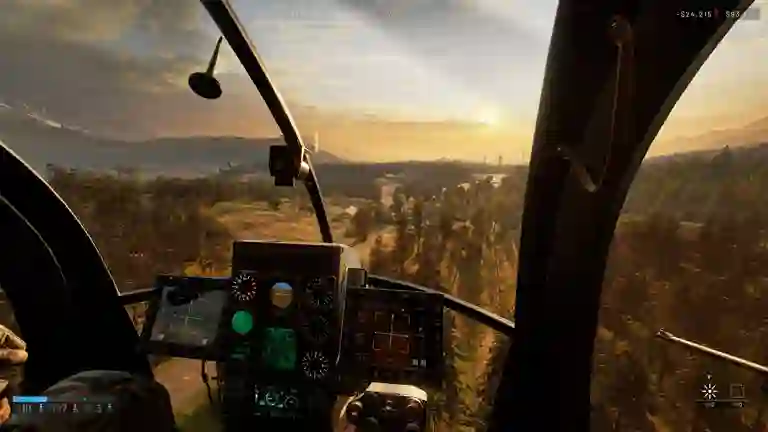
Official WARDOGS screenshot (Steam store). Stated by developer · 2026-09-15
The Battlefield-Style Layout (Community Recipe)
From the community keybind & helicopter FAQ, cross-checked with player guides:
- Switch mouse control on: Settings > Controls > Settings (not Keybindings) > set Rotary Vehicle Mouse Control = Enabled.
- Set Mouse Swipe Left/Right = Roll and Mouse Swipe Up/Down = Pitch.
- Rebind keys: Collective Raise = W, Collective Lower = S, Yaw Left/Right = A/D, then clear the Cyclic key bindings so WASD no longer tilts the aircraft.
- Keep arrow keys as a backup for collective/cyclic so a menu rebinding never strands you. Community report · 2026-09-15
Mouse Setup, Sensitivity and the Invert-Y Bug
- Pitch/roll sensitivity: start around 60–65% and adjust in the Firing Range — not in a live match. Community report · 2026-09-15
- If vertical mouse movement feels wrong, check Invert Y Axis – Infantry. Players report the infantry invert setting leaks into helicopter flight when rotary mouse control is on — flip it if your pitch is reversed. Community report · 2026-09-15
- Keep Space unbound from flight controls: it fires some vehicle weapons. Good news — the Season 1 changelog lists the hidden Spacebar vehicle-fire trigger as fixed (September 9, 2026), but until you have applied the update, treat an unexpected shot while flying as this bug, not a haunted mouse. Stated by developer · 2026-09-16 Community report · 2026-09-15
Flight Assists: Keep Them On (For Now)
WARDOGS ships flight assists on a master switch: Stability, Auto-Hover and Envelope Limits. Beginners should leave stability and auto-hover enabled — stability damps the aircraft, auto-hover holds position for spotting and taxi runs. Two refinements from pilots:
- Turn Envelope Limits off: it caps extreme pitch, yaw and collective inputs — exactly the sharp pulls you need in emergencies. Community report · 2026-09-15
- Auto-hover is a genuine preference split: skilled pilots toggle it, but it makes hovering beside towers and lining up shots dramatically easier while you are learning. Community report · 2026-09-15
Mouse mode is also preference: the settings default to Roll, but many pilots switch swipe behavior to Yaw and Pitch so the mouse simply "aims" the aircraft up/down/left/right while the keyboard does everything else. Community report · 2026-09-15
Season 1 Flight Changes (September 9, 2026)
The first post-launch patch touched rotary flight directly: a balance pass on the Z-20 Lakota, a fix for its sluggish pitch, input damping standardized across devices (keyboard pilots get the same smoothed feel controller players had), and mouse-swipe camera smoothing improvements for aiming turrets from the pilot seat. Economy side: the Little Bird's miniguns jumped to $50,000 and the Lakota costs $35,000 — check the money guide's fly-taxi loop before buying your first airframe.
Stated by developer · 2026-09-16Countermeasures: Timing Is the Whole Skill
- Two audio phases matter: the first beeping means a lock is being acquired; the solid tone means a solid lock — but neither means a missile is in the air. Releasing countermeasures too early is exactly what the attacker wants you to do (modern players fire, wait for your flares, then shoot). Community report · 2026-09-26
- You start with two countermeasures, and more can be purchased in the store's helicopter-ammo section — a resupply step most pilots skip. Community report · 2026-09-26
- Very low flight prevents lock-on entirely — but it is hard to fly and puts you inside CIWS, RPG and small-arms envelope. Community report · 2026-09-26
- Carry spare parachutes in the helicopter's inventory: a passenger can equip one from their seat and bail mid-flight. Don't bail low over the hot zone — you'll be spotted and shot on the way down; wait for altitude or distance. Community report · 2026-09-26
Techniques That Make It Click
- Sharp turns are two keys: combine A+Q (left) or E+D (right) instead of yawing alone. Community report · 2026-09-15
- Line up in third person, finish in first. Do the bulk of the approach in third-person camera, then switch to first person for the final alignment on the target. Community report · 2026-09-15
- Fast landings (transport pilots): coming in hot, bank to bleed speed and hold collective down immediately — the helicopter drops to the ground as it slows, and the final correction is a small mouse nudge. Community report · 2026-09-15
- "Delayed inputs" is a myth. The aircraft responds to what the rotors would do: hard banking bleeds speed. Reframe it as physics, not lag — and rule out real connection issues separately via server status. Community report · 2026-09-15
- Minigun resupply trick: at a resupply point, hold Left Shift and click the ammo type to load a full stack instead of clicking one belt at a time (Little Bird and larger minigun birds). Community report · 2026-09-15
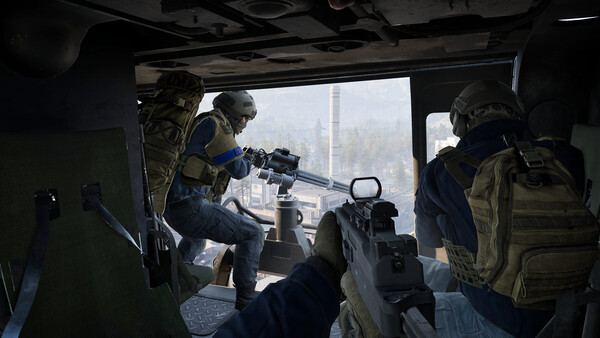
From the collective side of a helicopter cockpit in-game:
Official WARDOGS screenshot (Steam store). Stated by developer · 2026-09-15
The Rocket Pod Little Bird: An $18K Glass Cannon
The rocket-pod Little Bird (the Pilot 20 airframe) deserves its own section — a streamer who flew it all stream called it "way better than I thought":
- It costs $18,000 to buy, and the real bill is countermeasures — flares run $750 each and this airframe wants a lot of them. Budget the flares, not just the airframe. Community report · 2026-09-27
- Ammo is effectively endless ("you get so much ammo") — the trade-off is that the airframe is a glass cannon: it melts a CIWS faster than the CIWS melts it, but one good hit can end you. Community report · 2026-09-27
- Aiming quirk: the right pod shoots truer. The rockets are zeroed for ~100m and the right pod's salvo lands closer to the crosshair center — at close range aim slightly left of the target and let the right pod do the work. Community report · 2026-09-27
- Loadout habit from the same run: a small bag with spare ammo and two flares for the gunner seat. Community report · 2026-09-27
Free Look and Spotting
Hold (or double-tap) Left Alt for free look — essential for landing approaches and keeping eyes on a contact while flying. Spotting with the helicopter's observation role pairs with the money guide's taxi and spotter income loops.
Community report · 2026-09-15Video: Helicopter Keybinds and Settings in Practice
Video by its creator, embedded as community reference. Community report · 2026-09-15
D-sync and latency hit helicopters hardest — if your flight feels like it is fighting you in live matches, rule out connection issues via server status and error codes, then finish tuning your rig with best settings and the full controls table.
In This Section
Everything in Controls & Settings: the full controls table · helicopter controls · best settings for FPS & visibility · classes & roles.
All guide